How Synchronization Runs
Whether triggered manually from the Queued Entries page or automatically by a Job Queue Entry, the synchronization process follows the same sequence:
- License check: Validates that the Commerce 365 license is active.
- Initialization: The integration method performs its initialization. For Active, this transfers flagged Integration Entries to the queue. For Passive, this polls all monitored tables for recent changes. For Background, no initialization is needed since records are already in the queue.
- Process deletions: All queued entries with Synchronization Type "Delete" are processed first, in reverse priority order. For each entry, a deletion request is sent to the Commerce 365 Hub API. On success, the Magento ID mapping is removed and the queue entry is deleted.
- Process synchronizations: All queued entries with Synchronization Type "Synchronize" are processed in priority order. For each entry, the record is read from Business Central, transformed into a JSON payload, and sent to the Commerce 365 Hub API. On success, the queue entry is removed. On failure, the retry counter is incremented and the error message is stored.
- Commit per record: Each individual record is committed after processing. This means that if synchronization is interrupted, successfully processed records are not rolled back.
Job Queue Configuration
For automated synchronization, create a Job Queue Entry with:
- Object Type to Run: Codeunit
- Object ID to Run: NC365 Sync Mgt.
- Recurrence: Set the interval based on how frequently you want changes sent to Magento (e.g., every 1–5 minutes).
- Job Queue Category Code: Optionally set a category code to process only entities assigned to that category. This allows running multiple job queue entries in parallel — for example, one for catalog data and another for customer data.
If you use Job Queue Category Codes on your Integrated Entities, create one Job Queue Entry per category code. If no category code is set on the Job Queue Entry, all active entities are processed in a single run.
Queue
The Queued Entries page is the central view of all pending changes waiting to be sent to Magento. Each row represents a single record that needs to be synchronized or deleted.
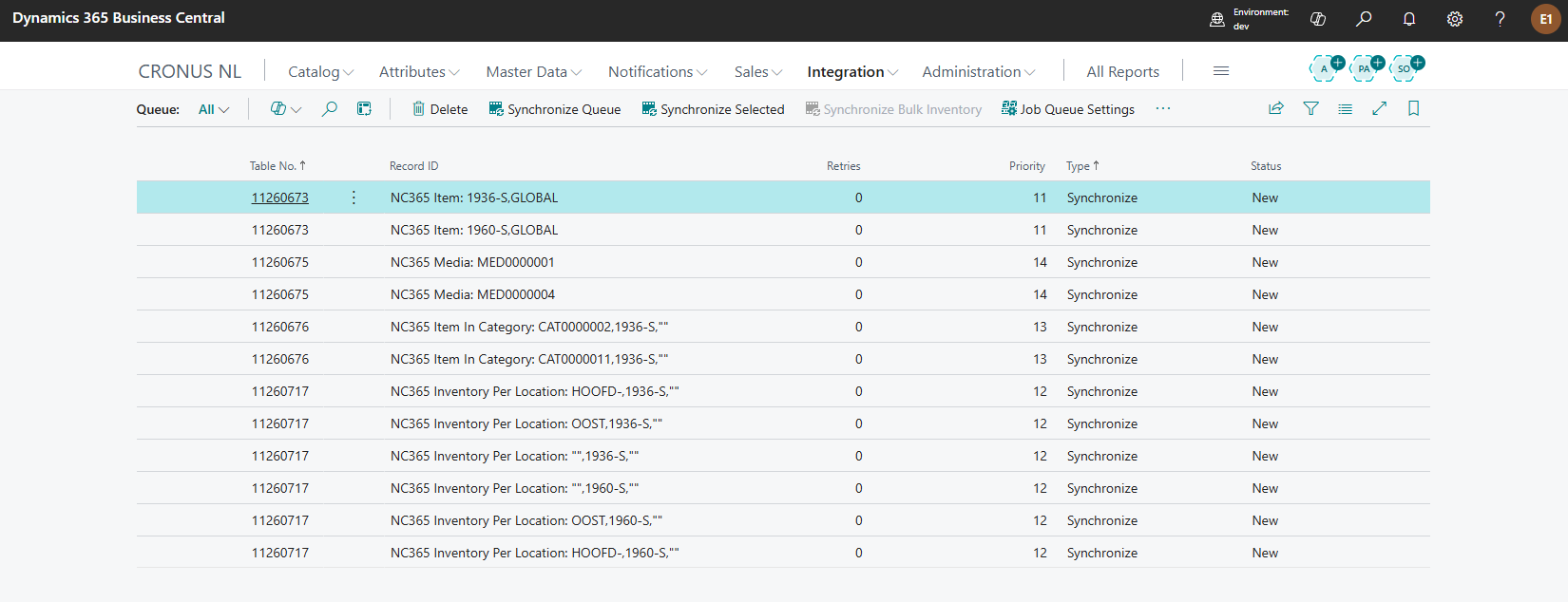
Queue fields
| Field | Description |
| Table No. | The Business Central table the record belongs to (e.g., NC365 Item, NC365 Category). |
| Record ID | Identifies the specific record within the table. |
| Type | Either Synchronize (create or update in Magento) or Delete (remove from Magento). |
| Priority | Inherited from the Integrated Entity configuration. Lower values are processed first. Deletions are processed in reverse priority order (highest priority entities deleted last) to respect dependencies. |
| Status | The current state of the entry — see Status Values below. |
| Retries | The number of times synchronization has been attempted for this entry. After 6 failed attempts, the entry is skipped automatically. |
Status values
| Status | Meaning |
| New | The entry has not been processed yet. |
| Successful | The entry was synchronized successfully. Successfully processed entries are automatically removed from the queue. |
| Failed | The synchronization attempt failed. Check the error message for details. The entry will be retried on the next run. |
| Record Not Found | The Business Central record no longer exists. The entry is removed from the queue. |
| Unreleased | The record exists but is not in a released state. The entry is removed from the queue. |
| Parent Not Synced | A parent record (e.g., the item for an item variant, or the attribute set for an attribute group) has not been synchronized to Magento yet. The entry remains in the queue and will be retried. |
| Children Not Synced | Child records have not been synchronized yet. |
| Missing Required Values | The record is missing values required by Magento. |
| Attribute Set Not Found | The attribute set referenced by the record does not exist. |
| Invalid Store | The Magento store mapping is incorrect or missing. |
| Skip | The entry was intentionally skipped by custom logic. |
Queue actions
The Queued Entries page provides the following actions:
- Synchronize Queue: Manually runs the full synchronization process: initializes change detection (depending on the method), processes all deletion entries, then processes all synchronization entries. This action is disabled when a job queue entry is active for the NC365 Sync Mgt. codeunit.
- Synchronize Selected: Processes only the selected entries. Useful for retrying specific failed records without running a full sync.
- Synchronize Bulk Inventory: Runs a bulk inventory synchronization using the Magento bulk API. Only available when the Bulk Inventory Updates feature is enabled.
- Job Queue Settings: Opens the Job Queue Entries page filtered to Commerce 365 entries, so you can manage scheduling.
- Show Details: Opens the Business Central record associated with the selected queue entry.
Was this article helpful?
That’s Great!
Thank you for your feedback
Sorry! We couldn't be helpful
Thank you for your feedback
Feedback sent
We appreciate your effort and will try to fix the article