Until Magento 2.4.3, Bearer token authentication was the standard method for connecting Magento to external systems. Today, OAuth is the recommended standard for API authentication.
Commerce 365 for Magento supports both authentication methods. See below to determine which configuration applies to your environment.
Add New Integration
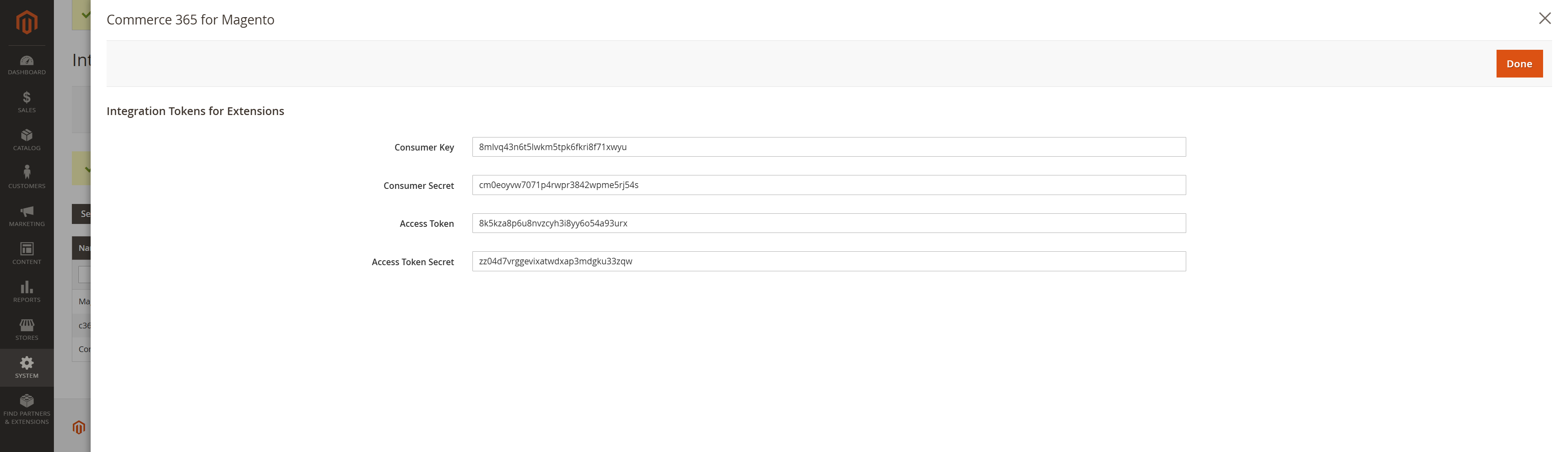
In the Magento backend, go to System > Integrations, and click on Add New Integration. On the next page you only have to provide a name, preferably ‘Commerce 365’, and on the second tab (API) just select Resource Access: All. Then click Save & Active. The system will show you a confirmation on all the resources this integration can access. Click Allow, and you will find the final screen which shows you 4 integration tokens.

From this confirmation screen, copy all values to the corresponding fields in Business Central.
Older versions of Commerce 365 for Magento
In case you are still working on a older version of Commerce 365 for Magento, it might be that your system does not support oAuth, but only allows authentication via a single Bearer Token. In Magento this type of authentication is disabled by default, but you can enable it via Stores > Configuration > Services > OAuth > Consumer Settings. Here you can set Allow OAuth Access Tokens to be used as standalone Bearer tokens to YES.

Reauthorize integration
If for some reason the Magento API is throwing errors that look like ‘Consumer is not authorized to access %resources’ it might be that the Access Token you are using is invalid. You can reauthorize the token by going to System > Integrations, and click on the ‘Reauthorized’ link for your integration. On the next page click on the Reauthorize button, and then copy the Access Token, and then click Done. Now paste the token in Business Central (Administration Setup Magento Magento REST API Access Token), and then check your connection status.
Enable
https://devdocs.magento.com/guides/v2.4/get-started/authentication/gs-authentication-token.html
Hosting Platform Specific Notes
There are a few Magento hosting providers who by default restrict the use of the REST API.
Was this article helpful?
That’s Great!
Thank you for your feedback
Sorry! We couldn't be helpful
Thank you for your feedback
Feedback sent
We appreciate your effort and will try to fix the article